
Critical Appraised Topics (CATs) – what are they and how do you create one?

A Critically Appraised Topic (CAT) is a form of summarised evidence that tries to present an answer to a specified clinical question. A CAT is different to a systematic review or meta-analysis as the intention is not to systematically seek out all the evidence on a topic, but to look for the best available evidence and quickly come up with an answer. A CAT might be appropriate where there was no national guidance, but is not robust on its own to override existing national guidance.

A CAT starts with a well-defined clinical question that is relevant, well-structured and answerable. This then needs to be translated into a search question using a framework such as PICO (Patient or problem, Intervention or exposure, Comparison or control, Outcome(s)).

For a therapy questions, PICO would consist of the patient's disease or condition, a therapeutic intervention (for example a drug, surgical intervention, or medical advice). The comparison might be standard care, another intervention, or a placebo, and the outcome might be, for example, reduced mortality rate, complications, or disease recurrence.

The P (Patient or problem) may also include information about the population group (for example, older people, or women).

For example, the question ‘In a patient with acute bronchitis, do antibiotics reduce sputum production?’ could be put into a PICO framework as:

  • P patients with acute bronchitis
  • I antibiotics
  • C none (it’s not always necessary to have a comparison)
  • O reduction in sputum production

The PICO framework aids searching in databases, by allowing you to search for each concept separately using thesaurus and free-text terms to cover synonyms and variant spellings, and then combine the searches together to find research that covers all the concepts.

Since most CATs are related to therapy questions, the most appropriate study design would be an existing systematic review, or randomised controlled trials (RCTs) and these could be found in databases such as the Cochrane Library, Medline, EMBASE and CINAHL. Search filters are available to help limit the search to systematic reviews or RCTs.

Library staff are happy to either provide training and assistance on how to search these databases, or can carry out evidence searches on your behalf.

Once suitable articles have been found, they need to be appraised for their validity, and the CASP checklists are a good way to do this. There are different checklists available different types of evidence, and each one asks the most pertinent questions for that type of research.

The final stage is to summarise the evidence to come up with an answer to the clinical question initially posed, or a clinical ‘bottom line’.

Library staff are happy to support the development of CATs through suggesting suitable search terms or translating a clinical question into PICO, selecting databases, and providing critical appraisal resources, and we can point you in the direction of further resources.

Resources on Strep A from UpToDate

The UpToDate point of care tool has a range of regularly updated articles summarising the evidence around Strep A.

These are being made available to anyone that needs access, without having to login to UpToDate.

All staff at Shrewsbury and Telford Hospital NHS Trust have access to UpToDate, both on and off-site of via the mobile app.

Quick links to Strep A information

As with all UpToDate clinical content the topics are written by experts in their field and the content is reviewed and updated as new evidence becomes available to support clinicians in reaching a diagnosis and treating patients who present with suspected Strep A quickly and effectively.
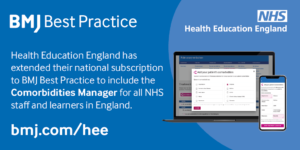

BMJ Best Practice Comorbidities Manager

Access to BMJ Best Practice has been extended to include the Comorbidities Manager. In the UK, one in three adults suffer from multiple chronic conditions and most patients in the acute setting have more than one medical condition.

The BMJ Best Practice Comorbidities Manager supports the management of the whole patient by including guidance on the treatment of a patient’s acute condition alongside their pre-existing comorbidities.

Available on desktop or app, NHS staff and learners in England can use BMJ Best Practice for free via an NHS OpenAthens account.

Making finding full-text easier

Whether you've got the title of an article you're looking for, want to look at the latest issue of a journal, or want to be able to access full-text articles when searching the web, there are a number of ways library and knowledge services can help.

From searching within the NHS Knowledge and Library Hub, using BrowZine, using LibKey Nomad, or using Google Scholar Library Links, our short guide and video show you how to make finding full-text a bit easier.

And if there is no full-text available, it's easy to request items from the library and let us do the leg-work!

Watch the video

Using Trip Pro to locate evidence

Trip Pro is a database that can help you locate material such as guidelines, evidence summaries, systematic reviews and much more.

The basic version of Trip can be searched by anyone, but the NHS has made the Pro version available and this offers more systematic reviews, medical images and advanced search features.

Trip Pro can be accessed on any PC within Shrewsbury and Telford Hospital NHS Trust, and off-site access is available via an NHS OpenAthens account. When you login with NHS OpenAthens, Trip Pro will automatically provide you with links to full-text articles (where available) including those available through our journal subscriptions.

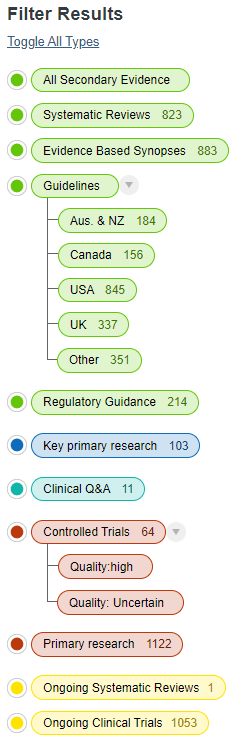
Trip offers a fairly basic interface, but you can filter results in a number of ways using the filters on the left-hand side. These include a filter for UK guidelines, making it easy to find any NICE guidance, along with guidance from Royal Colleges and other professional bodies. Trip claims to have the largest international collection of guidelines, and these can be filtered by region.

The filter for controlled trials offers an interesting feature whereby the RobotReviewer tool has been used to estimate the quality of trials as either 'high' or 'uncertain' based on the abstract, so a certain amount of critical appraisal has been carried out.

There are also filters for ongoing systematic reviews and clinical trials.

Although Trip Pro does not systematically search the journal literature, it does include a number of results classed as primary research, and these can be filtered to 'key primary research' or just 'primary research'. It's not clear how the distinction is made.

Trip offers a guide to which sources it searches.

Trip Pro searches a number of the resources that were covered by the NICE Evidence Search and is a partial replacement for it as NICE Evidence Search is closing at the end of March.


Accessing full-text is even easier in KnowledgeShare evidence updates

There has been a change in the way full-text links in KnowledgeShare Evidence Updates are provided that should make it easier for you to access the full-text of articles you are alerted to.

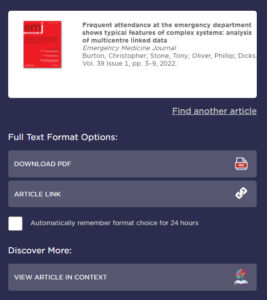
Where a resource (usually a journal article) has a link that says ‘Check for full-text availability’ you'll be taken to the LibKey system. The first time you use it, you'll need to specify which organisation you work for. Once you've done that, you'll be provided with links to the full-text (if we have access) or a link to our request form (if we don’t) which will automatically populate with the resource details to make it really easy to order a copy.

You'll need an NHS OpenAthens account to view full-text articles or to order items from us.

You may also see a link to 'View article in context' and this will allow you browse the contents of the journal issue where the article is.

If you haven't already signed up, our KnowledgeShare Evidence Update service is a personalised current awareness service allowing you to receive new evidence on topics  tailored to your requirements. It covers policy documents, guidance, reports, and a range of summarised evidence, so you won’t be inundated with primary research articles, and emails are sent each fortnight.


Get easier access to journal articles with LibKey Nomad

LibKey Nomad is a browser extension available for Edge, Chrome and Firefox that makes accessing the full-text of journal articles much easier. Once installed it indicates if an article is available in full-text through your library. Simply install the extension and select the organisation you work for. It works for all NHS organisations, so is available to staff of Shrewsbury and Telford Hospital NHS Trust and Shropshire Community Health NHS Trust.

As well as checking library subscriptions, LibKey Nomad also checks to see if the article is available via open access.

LibKey Nomad works on many publisher websites, along with PubMed and Wikipedia, and adds links to access the full-text or PDF (where available) making it easier to login and access the full-text quickly.

Visit our website for more browser extensions and mobile apps to make finding the evidence easier.

Mobilising Knowledge with Peer Assists

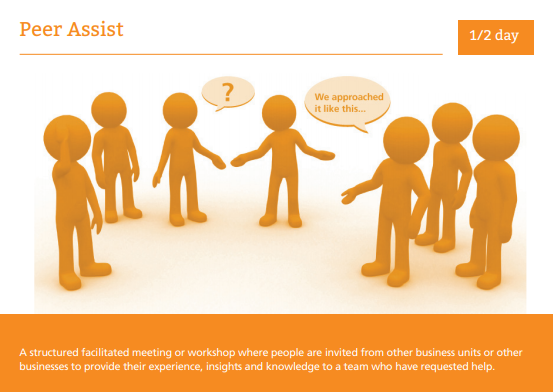
A peer assist is a knowledge management tool where peers (perhaps four or five people) from another team are invited to share insights, experience and knowledge at a facilitated meeting.

This might be to support a team that are looking to embark on a project or service change, or that have a specific problem or challenge, and want to know what worked (or what didn't) from another team that has similar experience. A peer assist can bring knowledge and experience to the point of need.

Peer assists allow people to learn from other people's experiences and knowledge, establish an open culture of learning, support networking, and stimulate new perspectives. They are part of the process of 'learning before doing' and are about gathering knowledge before embarking on an activity or project, or when facing a difficulty in the course of related events.

The home team asking for the peer assist needs to have clear objectives of what they want to gain from the meeting. Peers can come from within the organisation, or outside it, but are people with experience of the issue.

How do they work?

  • A facilitator is appointed, and lots of notice given. Background information is circulated to the home team and the visiting peers
  • Allow some time for socialising before the meeting, to build some rapport between the home team and the visitors
  • At the meeting, the home team presents the context and any plans, issues and opportunities, and say what they'd like to get out of the meeting
  • The visiting peers ask questions, and provide feedback on what worked (or what didn't) for them, and provide recommendations, options or guidance
  • The home team reflects on what's been said, and examines options
  • The visitors provide feedback, answer questions, and suggests some actions for the home team

Meeting can be face-to-face or virtual, and the time can be anything from 1.5 hours to half a day (or even longer if necessary!). Flipcharts are ideal for face-to-face meetings, but someone on the home team should take detailed notes as well.

It's important to remember that as well learning from experience, the evidence base needs to be taken into consideration as well when making decisions. Library staff are able to conduct evidence searches to support decision-making, or find case studies or what worked elsewhere.

Peer assists are not peer reviews - the visiting team are not coming to critique the home team, but to transfer knowledge.

Further reading


Learn more about using UpToDate to provide care with confidence

The UpToDate clinical decision support tool provides evidence-based advice on over 11,000 topics to support the diagnoses, treatment and management of common and rare conditions. It can be accessing onsite via the Intranet, or off-site using an NHS OpenAthens account or a personal account created onsite. Mobile apps are also available, and for more information on the various ways to access UpToDate, visit our UpToDate page.

UpToDate are offering a free 30-minute live training session to help you make the best use of UpToDate and explore some of the ways it can help you. Topics covered include:

  • Creating an account
  • Earning and submitting CME/CPD
  • Conducting a normal or advanced search
  • Help reduce medication errors with Drugs & Drug Interactions
  • COVID-19 common questions and answers
  • What's New & Practice Changing Updates
  • Patient engagement and safety

The training is on Tuesday, May 18th at 2.30pm and is being carried on Microsoft Teams. To join, simply follow this link at the time - there is no need to book.